
Firewalls
Sophos Firewall गाइड
Sophos Firewall में Cybora threat feeds को Active Threat Response और third-party threat feeds के साथ जोड़ें, ताकि indicators automatically block हों.
अंतिम अपडेट: 14 अगस्त 2026
इस पेज पर
Is guide ka upyog karke Sophos Firewall me Active Threat Response aur Third-party threat feeds ke zariye Cybora feed add karein.
Cybora independently curated signals ke zariye Sophos threat feeds ko complement karta hai. Yeh feed ek additional security layer deta hai aur Sophos X-Ops, IPS, EDR ya SIEM jaise existing controls ko replace nahi karta.
Zaruri requirements
- Sophos Firewall 21.0 ya usse naya.
- Xstream Protection Bundle. Third-party threat feeds is bundle me shamil hain. Iske liye kisi additional Sophos Central license ki zarurat nahi hai. Status Administration > Licensing me check karein.
- Ek firewall rule jo internal network se WAN tak traffic allow karta ho.
- Validation aur troubleshooting ke liye logging ko Logging aur dashboard setup karein section ke mutabik configure karein.
Traffic detection configure karein
Feed successfully synchronize ho sakta hai, phir bhi expected match block na ho. Iska matlab automatically yeh nahi hai ki feed me koi problem hai. Sophos Firewall indicator type ke hisab se traffic ko pehchanne ke liye alag functions use karta hai. Pehle test se pehle niche diye gaye settings configured hone chahiye:
- IPv4 addresses: internal network se WAN tak traffic ke liye firewall rule.
- Domains: firewall rule ke saath Application Classification ya IPS Policy enabled ho.
- URLs: domain wali requirements ke saath HTTPS decryption, taki firewall poora URL path padh sake.
IPv4 addresses ka setup sabse seedha hai: traffic ko internal network se WAN tak ek matching firewall rule se guzarna hoga. Domains ke liye Sophos ko Application Classification ya IPS Policy bhi chahiye. Agar Sophos Firewall khud DNS server ka kaam karta hai, to woh DNS module ke zariye domain matches detect kar sakta hai. Agar clients external DNS server use karte hain ya traffic HTTPS se jata hai, to IPS se judi settings bhi sahi honi chahiye.
URL feeds par thoda adhik dhyan dena padta hai. Decryption ke bina firewall HTTPS connection ke SNI header me sirf domain name dekh sakta hai, /login ya /payload jaisa poora path nahi. URL indicator ko bharosemand tarike se detect karne ke liye HTTPS traffic ko inme se kisi ek tarike se decrypt karein:
- Web Proxy mode me firewall rule ke Web filtering section me
Use web proxy instead of DPI engineaurDecrypt HTTPS during web proxy filteringenable karein. - DPI mode me
Use web proxy instead of DPI enginedisabled rakhein. Uske baad Rules and policies > SSL/TLS inspection rules me internal-to-WAN traffic ke liyeDecryptaction wala rule banayein.
Agar expected match na mile, to pehle firewall rule, phir Application Classification ya IPS, uske baad HTTPS decryption, aur aakhir me configured exceptions check karein. Threat Exclusions, traffic allow karne wali Web Policy, Web > Exceptions ke entries ya Don't Decrypt action wala SSL/TLS rule kisi IoC ko detect ya block hone se rok sakta hai.
Match par response
Block action ke saath Sophos Firewall match ko log karta hai aur identified connection ko block karta hai. Monitor match ko log karta hai, lekin traffic allow karta hai. Traffic ka sahi firewall module se inspect hona aur kisi exclusion ka detection ko bypass na karna ab bhi zaruri hai.
Threat feeds ke liye Security Heartbeat zaruri nahi hai. Agar Synchronized Security configured hai aur Sophos-managed endpoint kisi malicious server se contact karne ki koshish karta hai, to endpoint ko red Security Heartbeat status mil sakta hai. Firewall affected endpoint ko identify karke uska traffic block karta hai aur logs me IoC, host, user aur process ki information dikha sakta hai. Lateral Movement Protection compromised endpoint ko isolate karta hai, taki attacker network me lateral movement na kar sake. Zyada details ke liye related firewall modules aur Synchronized Security par Sophos description dekhein.
Steps
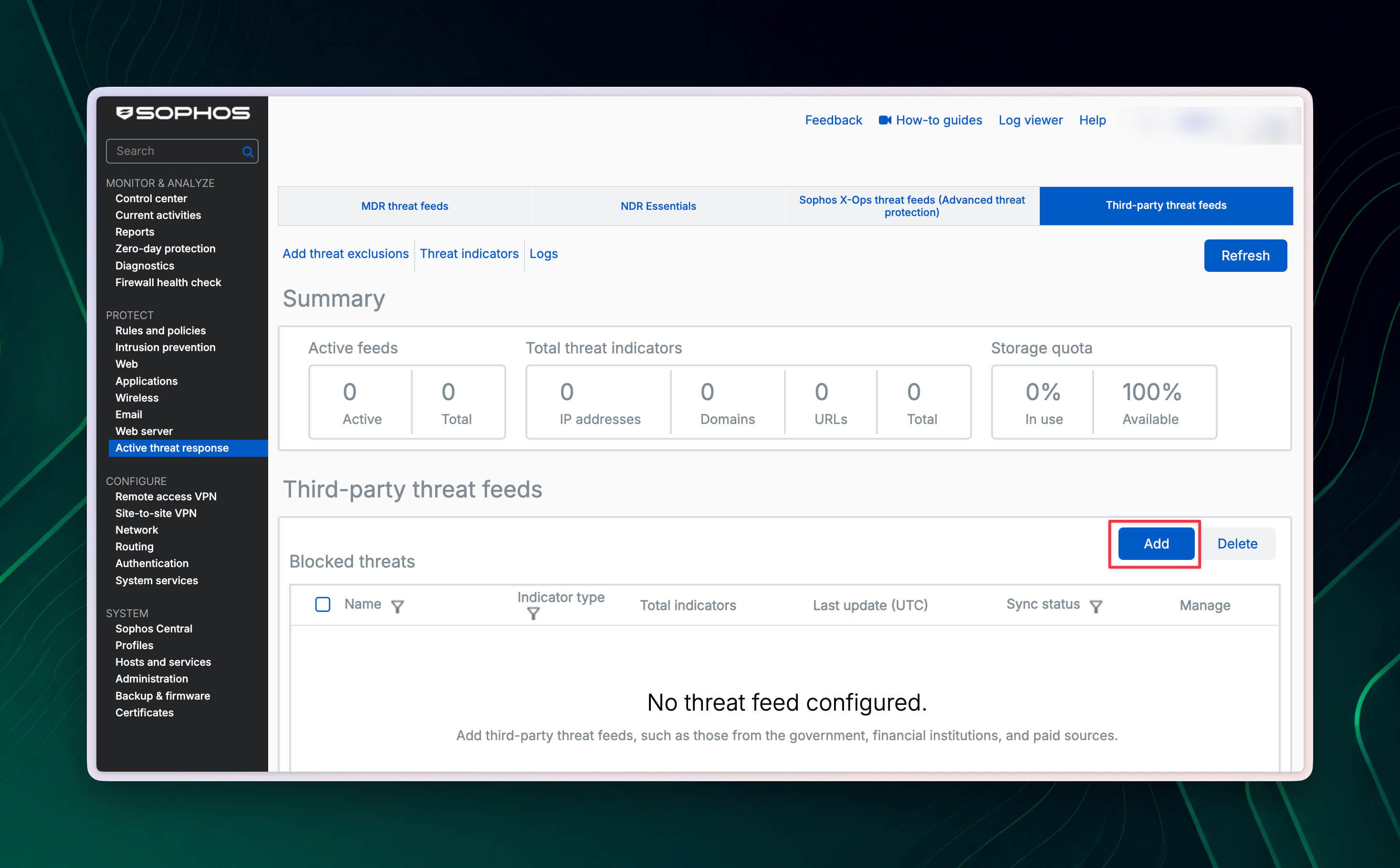
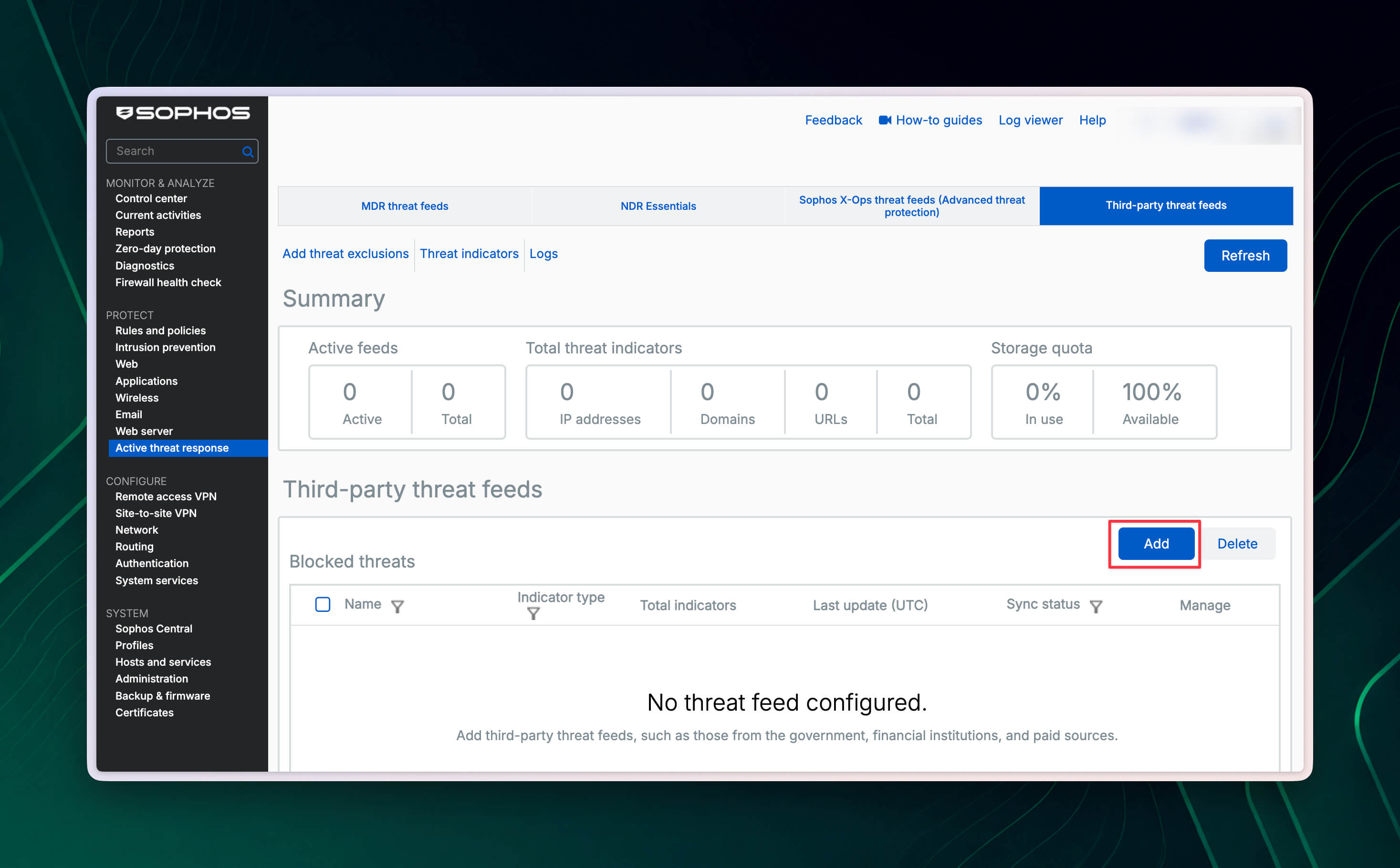
Protect > Active threat response > Third-party threat feeds par jayein aur Add par click karein.
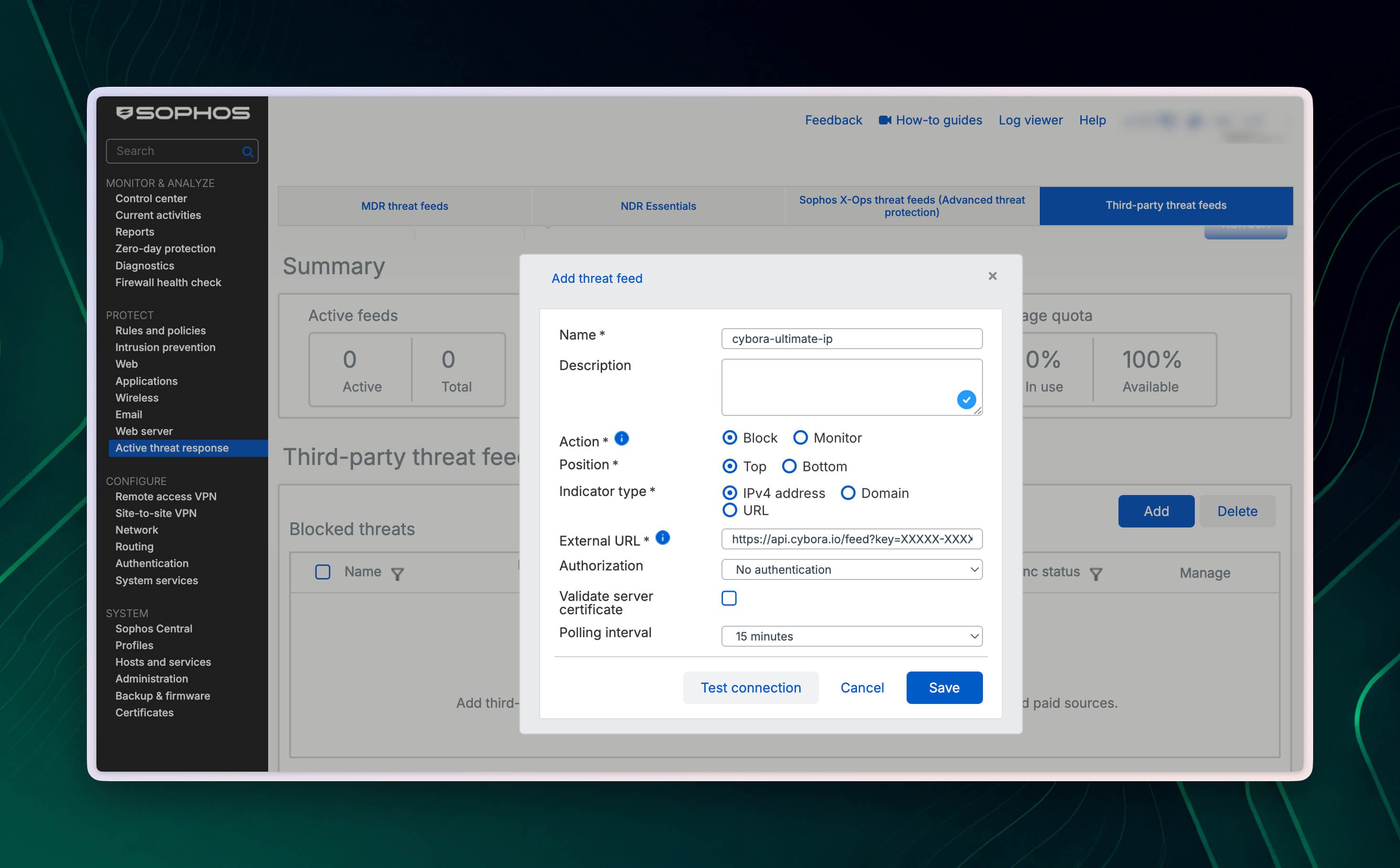
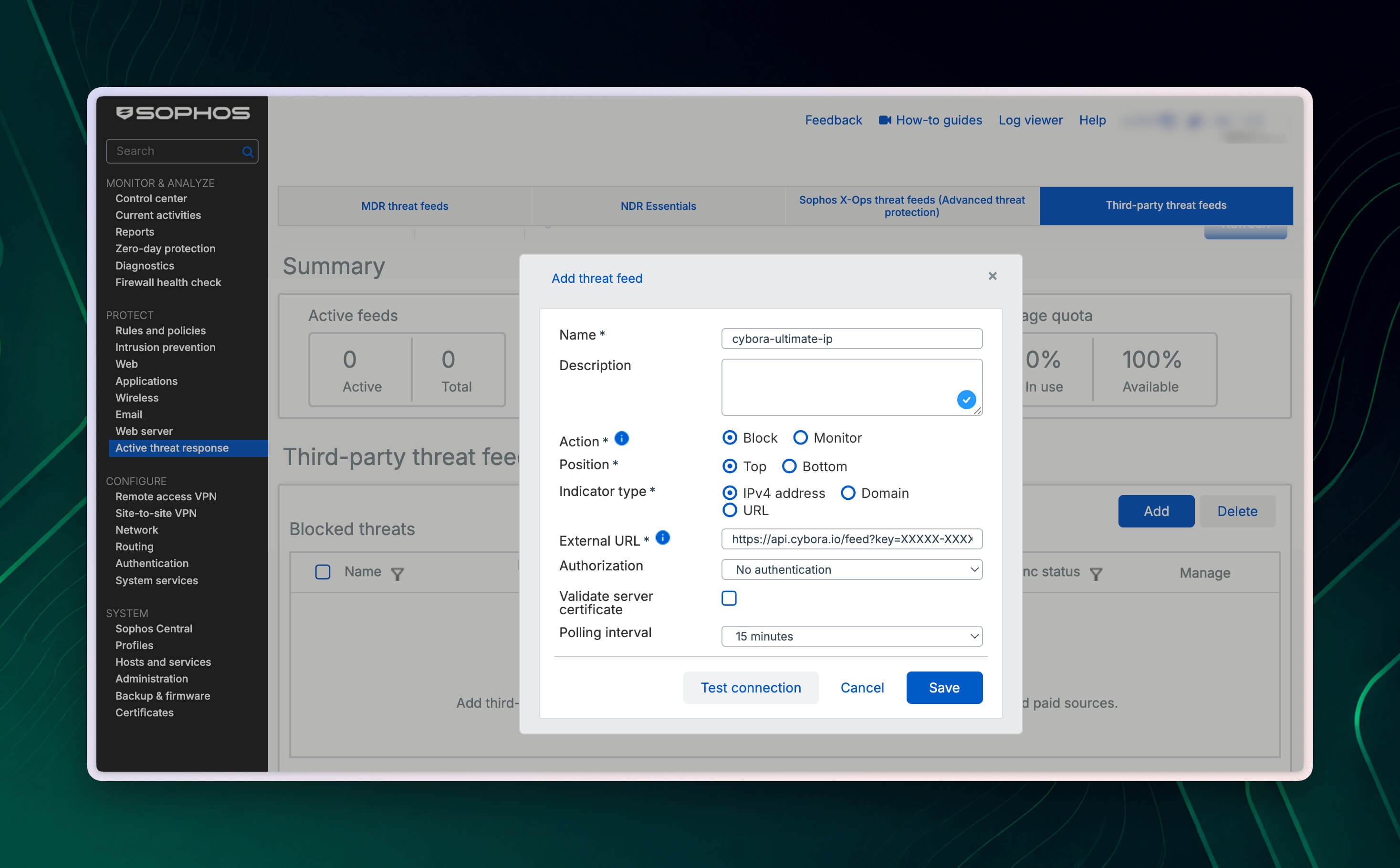
Ek unique naam dein, jaise
cybora-ultimate-ip. Description optional hai.Action ke andar required action select karein:
Blockmatches ko log aur block karta hai. Production use ke liye yahi hamari recommendation hai.Monitormatches ko log karta hai, lekin traffic block nahi karta.
Position ke andar feed ki list position select karein. Sophos blocked aur monitored feeds ko displayed order me evaluate karta hai aur pehla match log karta hai. Agar Cybora feed ko niche wale feeds se pehle check karna hai to
Topselect karein.Cybora feed URL ke
typeparameter se matching Indicator type select karein:IPv4 address,DomainyaURL. Agar plan me kai indicator types hain, to har type ke liye matching URL ke saath alag feed configuration banayein.External URL ke andar poora Cybora feed URL paste karein. Personal license key purchase ke baad email se bheji jati hai. IPv4 addresses, domains ya URLs ke liye sahi URL banane ka tarika Feed URL format aur license key guide me diya gaya hai.
Authorization ke andar
No authenticationselect karein. Cybora me key feed URL kekeyparameter me pehle se shamil hoti hai.Validate server certificate enable karein, taki Sophos Firewall Cybora endpoint ka TLS certificate verify kare. Certificate error aaye to Certificates > Certificate authorities me check karein ki issuing public CA available hai.
Polling interval ko bilkul Cybora plan ke mutabik set karein. Plan jitni frequency allow karta hai, usse adhik baar feed request na karein. Allowed interval me sirf ek request permitted hai. Bahut frequent polling ki wajah se feed block ho sakta hai.
XGS 87/87w, 88/88w aur 107/107w models par sirf 24 hours, 7 days aur 30 days ke polling intervals available hain. Is case me aisa available interval select karein jo Cybora plan ki allowed frequency se adhik baar query na kare.
Test connection par click karein. Test successful ho to Save par click karein.
Iske baad Sophos Firewall configured interval par feed automatically retrieve karta hai aur IoC list updated rakhta hai. Feed file me har line par ek indicator hota hai. Sophos in feeds me IPv6 addresses, IP ranges, network addresses, wildcard domains ya regular expressions support nahi karta.
Threat Exclusions configure karein
Agar koi legitimate host ya service galti se block ho jaye, to targeted exclusion banayein. Threat Exclusions ka use sambhalkar karein: ek exclusion sabhi Active Threat Response modules par apply hota hai, sirf Cybora feed par nahi. Excluded traffic threat feeds ke against match nahi hota aur isliye security risk paida kar sakta hai.
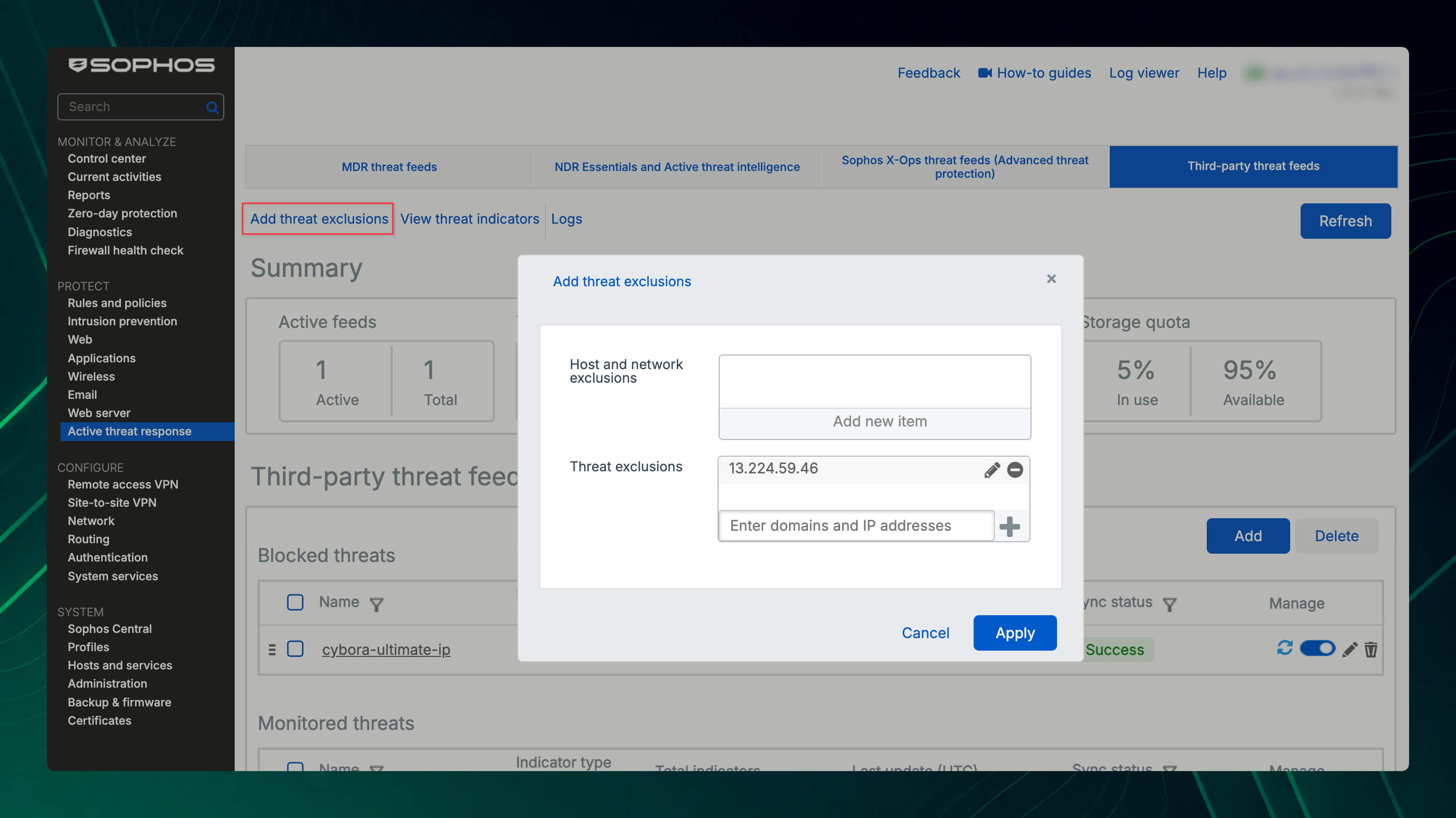
- Protect > Active threat response par jayein aur feed overview ke upar Add threat exclusions par click karein.
- Existing hosts ya networks ke liye Host and network exclusions ke andar Add new item par click karke required objects select karein.
- Threat exclusions ke andar individual IP addresses, domains ya URLs enter karein aur har entry ko plus button se add karein. Ek entry maximum 128 characters ki ho sakti hai.
- List check karke Apply par click karein. Jo exclusions ab zaruri nahi hain, unhe isi dialog me edit ya remove kiya ja sakta hai.
Exclusion tabhi banayein jab logs me event check karke confirm ho jaye ki yeh false positive hai. Broad network exclusion ki jagah specific host, individual IP address, domain ya URL ko prefer karein. Zyada details ke liye Sophos Threat Exclusions instructions dekhein.
Logging aur dashboard setup karein
Sahi log settings se pata chalta hai ki kaunsa IoC detect hua, kis Active Threat Response module ne match process kiya, aur firewall ne traffic block kiya ya sirf log kiya.
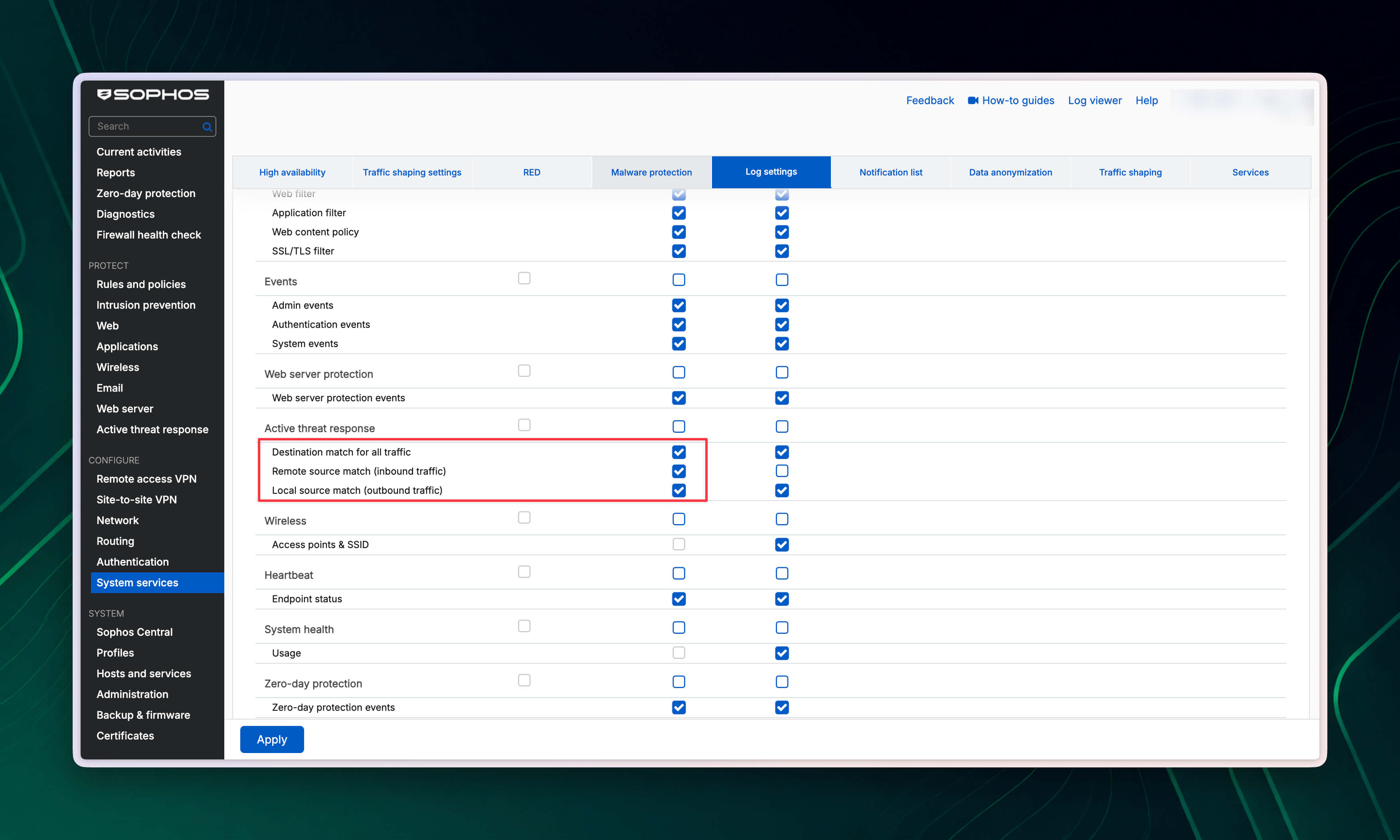
- System services > Log settings par jayein.
- Active threat response ke andar Local reporting column me required log categories enable karein:
Destination match for all trafficoutbound traffic me destination IP address, domain aur URL matches ko record karta hai.Remote source match (inbound traffic)DNAT aur WAF jaise inbound forwarded traffic me source IP address matches ko record karta hai. Yeh category default me off hoti hai aur in events ke liye ise explicitly enable karna padta hai.Local source match (outbound traffic)outbound traffic me local source IP address matches ko record karta hai.
- Events ko syslog server ya Sophos Central par bhi bhejna ho to corresponding column me yahi categories enable karein. Central reporting tabhi dikhai deta hai jab firewall ke Sophos Central page par reports aur logs bhejna enable ho.
- Apply par click karein.
Match kahan log hota hai
Log component indicator aur traffic path par depend karta hai:
- Forwarded traffic me IPv4 address ko Firewall module process karta hai.
- Sophos Firewall ko bheji gayi DNS request ko DNS module process karta hai.
- Kisi doosre DNS server ko bheji gayi DNS request ko IPS process karta hai.
- DPI mode me HTTPS traffic ko IPS aur SSL/TLS Inspection process karte hain.
- Web Proxy mode me HTTPS traffic ko Web module process karta hai.
Poora URL path padhne ke liye HTTPS decryption ab bhi zaruri hai. Detailed view ya forwarded syslog events me log_component dikhata hai ki match ko Firewall, DNS, IPS ya Web me se kisne process kiya. threatfeed field triggering module ya configured Third-party Threat Feed ko identify karta hai. Isse confirm kiya ja sakta hai ki match Cybora, MDR, NDR Essentials ya Sophos X-Ops ko assign hua tha.
Individual events aur blocked IoCs dekhne ke liye Log viewer me Active threat response select karein. Control Center ka Active threat response widget configured Third-party Threat Feeds, unka synchronization status aur in feeds se block hui threats ki sankhya dikhata hai. Local Reporting support na karne wale devices, jaise XGS 87/87w aur 107/107w, par widget me Reports button nahi dikhta. Zyada details Sophos logging aur alerts instructions aur Active Threat Response widget description me hain.
Log-and-Drop events ko email ya SNMP se receive karne ke liye System services > Notification list me required Active Threat Response events enable karein. Remote source match (inbound traffic) alerts Sophos Central ko forward nahi hote, lekin related logs Central Firewall Reporting me available rehte hain. Available events ki list Sophos ATR notification reference me di gayi hai.
Sophos Firewall modules ko fixed order me process karta hai: pehle MDR Threat Feeds, phir NDR Essentials, Sophos X-Ops aur aakhir me Third-party Threat Feeds. Agar pehle wala module kisi IoC ko already block kar de, to match usi module ke andar log ho sakta hai aur Cybora feed evaluate nahi hota. Log only ya Monitor me individual events kai modules ke liye dikh sakte hain. Agar expected match Cybora feed ke andar na dikhe to is evaluation order ko dhyan me rakhein.
Deep troubleshooting ke liye alag log files useful hain:
atr.loglicensing aur configuration status dikhata hai, jabkiatr-service.logservice startup aur shutdown record karta hai.- IPv4 IoCs ke liye
firewall_rule.logbhi check karein. - Domain aur URL IoCs ke liye traffic path ke mutabik DNS, SSL/TLS Inspection aur Web Proxy logs check karein, jaise
dnsd.log,ips.log,httplogd.logaurawarrenhttp.log.
Sophos troubleshooting log file reference me iska overview diya gaya hai.
Synchronization status samjhein
Sync status dikhata hai ki Sophos Firewall feed ko retrieve aur process kar saka ya nahi. Successful retrieval se abhi yeh confirm nahi hota ki koi specific traffic match detect ya block hoga:
Success: Feed URL se connection yaGETrequest successful thi.Fetching: Feed abhi download ho raha hai.Authentication error: Credentials aur possible TLS handshake errors check karein.Connection error: Internet connectivity, feed server ki reachability aur 404, 500 ya unexpected redirect jaise HTTP errors check karein.SSL/TLS error: Certificates > Certificate authorities me required public ya private CA available hai ya nahi, check karein.Failed: Check karein ki feed URL valid plain-text file return karta hai aur har line me ek supported indicator hai.Storage full: Shared storage quota poori list ko store nahi kar sakta. Guidance ke liye agla section dekhein.
Sophos synchronization status reference me additional causes diye gaye hain. Firewall backup restore karne par feed configurations restore ho jati hain, lekin pehle download hui IoC lists restore nahi hoti. Restore ke baad firewall feeds ko dobara retrieve karta hai aur configured action phir se apply karta hai. Zyada information Sophos Active Threat Response FAQ me hai.
Storage limits aur Storage full
Sophos Firewall sabhi Third-party Threat Feeds ke liye ek shared storage quota deta hai. Kisi ek feed ke liye alag IoC count limit nahi hoti. IPv4 addresses, domains aur URLs total available storage share karte hain. Isliye ek bada feed poora quota use karke additional indicators ko store hone se rok sakta hai.
SFOS 22.0 me 50 tak Third-party Threat Feeds configure kiye ja sakte hain. Yeh configuration count hai aur storage quota ya stored IoCs ki sankhya se alag hai. Sophos ko IPv4 addresses, domains aur URLs ke liye separate configurations chahiye, isliye teen indicator types 50 available entries me se teen entries use karte hain.
Sophos KBA me niche diye gaye approximate maximum values hain:
| Models aur platforms | IPv4 addresses | Domains | URLs |
|---|---|---|---|
| XGS 87(w) XGS 88(w) XGS 107(w) XGS 116(w) Sabhi virtual aur cloud firewalls | 180,000 | 98,000 | 18,000 |
| XGS 126(w) XGS 118(w) | 270,000 | 140,000 | 28,000 |
| XGS 136(w) XGS 128(w) XGS 138 XGS 2100 XGS 2300 | 900,000 | 490,000 | 94,000 |
| XGS 3100 XGS 3300 XGS 4300 XGS 4500 | 2,700,000 | 1,480,000 | 280,000 |
| XGS 5500 XGS 6500 | 4,500,000 | 2,470,000 | 470,000 |
| XGS 7500 XGS 8500 | 8,800,000 | 10,100,000 | 1,900,000 |
Domain values 64 characters ki average length aur URL values 512 characters ki average length par based hain. Lambi entries store ki ja sakne wali total sankhya kam karti hain. Isliye yeh figures guidelines hain, guaranteed limits nahi.
Virtual aur cloud firewalls ke liye KBA appliance size se independent ek constant limit clearly batata hai. Isliye additional RAM approximate guideline ko 180,000 IPv4 addresses, 98,000 domains ya 18,000 URLs se zyada nahi karta.
Agar feed Storage full dikhaye, to Active threat response > Third-party threat feeds me Total threat indicators aur Storage quota check karein. Redundant feeds delete karein aur environment ke liye zyada relevant, chhoti lists use karein. Firewall configured interval par feed poll karta rehta hai aur sufficient storage available hote hi list dobara update karta hai.
Version note
Sophos Firewall 21.x me Active Threat Response kuch inbound traffic types, including DNAT aur WAF traffic, ke source IP ko match nahi karta.
Sophos Firewall 22.0 se Active Threat Response inbound forwarded traffic, jaise DNAT aur WAF, ke source IP ko bhi consider karta hai. Isse in scenarios me feed coverage improve hoti hai.
Aage padhne ke links
- Storage limit for third-party threat feeds
- Third-party threat feeds
- Configure third-party threat feeds
- Licenses for threat feed modules
- Firewall configurations for threat feeds
- Active threat response in Sophos Firewall 22.0
Validation
Save karne ke baad Active threat response > Third-party threat feeds me niche diye gaye points check karein:
- Sync status me
Successdikh raha ho. - Total threat indicators me expected IPv4 addresses, domains ya URLs ki sankhya ho.
- Threat indicators ke andar loaded feed me individual IoCs search kiye ja sakein.
- Logs ke andar IoC se related traffic ke matches dikh rahe hon.
- Control Center ke Active threat response widget me expected feed aur synchronization status dikh raha ho.
Agar domain ya URL feeds ko HTTPS par use kar rahe hain, to yeh bhi check karein ki decryption aur required rule settings sahi configured hain, taki firewall traffic ko expected tarike se identify kar sake. Agar kisi feed me lambe samay tak relevant matches na milen, to review karein ki environment me uski zarurat hai ya nahi. Unneeded feeds remove karke zyada relevant IoCs ke liye storage free ki ja sakti hai.